
WordPress, Squarespace or Wix: Brochure Site Cost (AU)
Only need a brochure website? Here's the honest 3-year cost of WordPress vs Squarespace or Wix for Australian small businesses — and which one actually fits.
WEBSITE
6/20/20265 min read


WordPress, Squarespace or Wix for a Brochure Website? The Honest Cost Breakdown
If you run a small business and all you need is a clean, professional "brochure" website, you've probably heard conflicting advice about which platform to build it on.
Some people swear by WordPress. Others won't touch anything but Squarespace or Wix. The reality is less dramatic than either camp suggests: the right platform depends on what your site actually has to do. For a straightforward brochure site, the structure of the costs matters more than the brand loyalty — and most of those costs are invisible on the pricing page.
This article walks through where the money actually goes, so you can judge the choice on facts rather than opinion.
First, what counts as a "brochure site"?
A brochure website is the digital version of a printed brochure: a handful of pages — Home, About, Services, perhaps a gallery, and a Contact page with an enquiry form. No online store, no bookings system, no member logins, no constant stream of new content.
Plenty of businesses genuinely only need this — a trades business, a consultant, a café, a clinic that books by phone. If that describes you, the comparison below is written for your exact situation. If you expect to need a shop, bookings or a content-heavy site soon, the maths shifts, and it's worth saying so up front.
A website has two cost layers, not one
The most common mistake is comparing the monthly subscription and stopping there. A website actually carries two separate cost layers, and only one of them appears on the pricing page.
The first is the running cost — hosting, your domain name, and any platform subscription. This is what keeps the site online.
The second is the upkeep cost — the technical work required to keep the site secure, patched and functioning after it's built: software updates, plugin updates, security monitoring, and working backups. This is the layer people forget, and it's where WordPress and the hosted builders genuinely differ.
A third cost exists too, but it sits outside this comparison entirely: the design and build of the site in the first place, and any later support work — content changes, SEO, edits, new sections. That applies on either platform and varies enormously by project, so this article holds it aside and focuses purely on what it costs to keep a finished brochure site running and safe. We'll flag where it matters.
With that framing, here are the two options.
Option 1: Squarespace or Wix (the all-in-one builders)
With Squarespace or Wix, you pay one subscription and the platform handles almost everything behind the scenes: hosting, security, SSL certificates, software updates and backups are all included and managed for you. You're renting a fully serviced space rather than owning one you have to maintain.
Indicative running costs (AUD, as of June 2026):
Squarespace business-tier plans sit around $27–$43/month, depending on whether you pay annually or monthly.
Wix's comparable plans land in a similar band, broadly $24–$40/month.
A custom domain is usually free for the first year, then roughly $25–$35/year after that.
That puts you in the region of $350–$500 per year, all in — with essentially no separate upkeep bill, because the platform performs the upkeep itself.
What you're really buying is the absence of background rot. There are no plugins to keep current, no security patches to chase, no compatibility breakages to discover six months later. For an owner who will never log in to perform technical maintenance, that isn't a limitation — it's the whole proposition.
The trade-off is flexibility. You work within the platform's structure. You can build a genuinely professional brochure site — these platforms are designed for precisely this — but if you later need something unusual or deeply custom, you can hit a ceiling. For a brochure site, you almost never reach it.
Option 2: WordPress (the self-managed option)
WordPress differs in kind, not just in price. It's open-source software installed on hosting you arrange yourself, with the site assembled from a theme plus plugins. It's extraordinarily capable and runs a large share of the web — but that capability comes with responsibility.
Indicative running costs (AUD, as of June 2026):
Domain: ~$15–$25/year
Decent hosting: ~$120–$300/year (cheaper hosting exists, but it's where many security problems begin)
Premium theme or plugin licences, where used: $0–$400/year
On paper that can look cheaper than a builder subscription — as little as $135/year running lean. But that figure only covers the first cost layer. The second is where WordPress earns its reputation for hidden expense.
A WordPress site needs its core software, theme and plugins kept up to date — routinely, not occasionally — because outdated plugins are the single most common way small-business websites are compromised. It also needs working, tested backups and some form of security monitoring, plus a check that each update hasn't quietly broken something else.
This is technical upkeep — and it's worth being precise about what it is and isn't. It keeps the site secure and online. It is not the same as ongoing support work like content updates, SEO or design tweaks; those are a separate thing again, on any platform. Done yourself, technical upkeep is "free" in dollars but real in time and risk. Done properly by someone else — checking updates on a staging copy, verifying backups, monitoring security rather than just clicking "update" — a genuine technical maintenance plan typically runs $50–$150/month.
That number is what reshapes the comparison. Add real upkeep and WordPress is usually the more expensive option to run for a brochure site, not the cheaper one.
The two options side by side (3-year running cost)
A website isn't a one-month purchase, so here's how the running and upkeep layers stack up over a realistic three-year life for a simple brochure site:
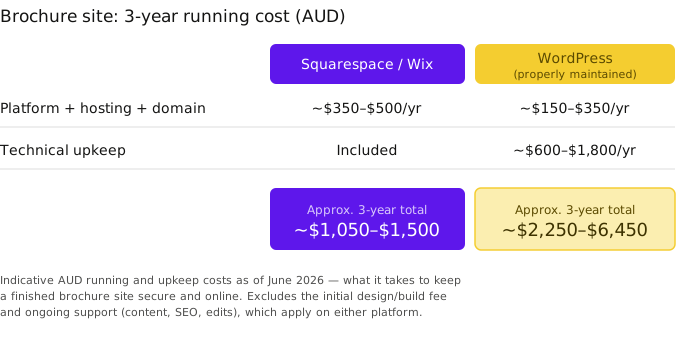
The gap is real, and it's worth understanding why rather than reading it as "WordPress is dearer." You aren't paying more for a worse product. You're paying for a more capable, more flexible platform — and for the upkeep that capability demands. If you need that flexibility, the spend is justified. For a brochure site, you usually don't need it.
So which actually fits?
The honest guidance is straightforward once the cost layers are clear.
Squarespace or Wix fits when your site is essentially a brochure, you want predictable all-in running costs, and you never want to think about security patches or plugin updates. It's the right tool for that job — and being the right tool isn't a compromise.
WordPress fits when you need genuine flexibility now or will soon: a serious online store, custom functionality, a content-heavy site you'll grow over time, or integrations a builder can't accommodate. WordPress earns its keep when you're actually using what makes it powerful — and the upkeep cost is the fair price of keeping that power safe.
The poor outcome, and the most common one, is a WordPress site built for a business that only ever needed a brochure, then left unmaintained because nobody budgeted for the upkeep. That's how a "cheaper" site gets compromised eighteen months later. The cheapest website is rarely the one with the lowest sticker price; it's the one matched correctly to what the business actually needs.
The bottom line
There's no universally best platform — only the best fit for your site. For a small business that needs a professional brochure website and nothing more elaborate, a hosted builder like Squarespace or Wix is usually the more predictable and lower-maintenance choice over its life. WordPress is an excellent platform, but it's built for jobs larger than a brochure, and it asks for upkeep to match.
The part worth getting right is knowing which one your site actually needs — and now you can work that out from the costs themselves, before spending a cent on the build.
If you'd like a hand deciding which one fits your business, get in touch.
SORIN CREATIVE
© Sorin Creative 2026. All rights reserved. ABN 66 163 034 167.